Airavata is a Hindi instruction model that follows everyday requests clearly. It is open-source and tuned to be helpful and polite, making it a reliable choice for Hindi writing, answers, and assistance.
To run Airavata locally on your computer, the following requirements must be met:
No technical setup needed — anyone can try Airavata using below mentioned steps.
Go to the Airavata GGUF repository on Hugging Face. Click the copy icon next to the repository name to copy the model path. (See image below.)
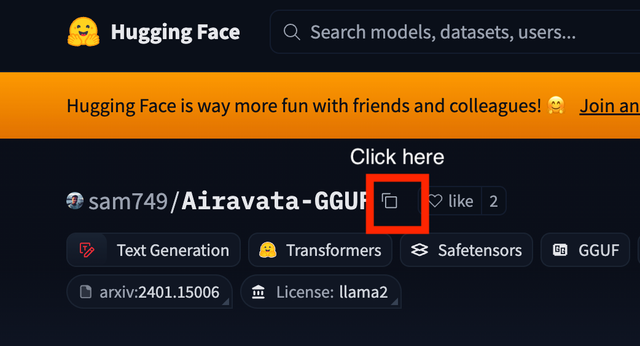
Open a terminal window and run the following command and paste the copied GGUF repository as mentioned below:
ollama run hf.co/PASTE_THE_COPIED_HERE
Press Enter.
Note: After pasting the repository, your command will look like this:
ollama run hf.co/sam749/Airavata-GGUF
Ollama will download and initialise the model. Once ready, you'll see the following prompt:
>>> Send a message (/? for help)
Type your message at the prompt and press Enter to interact with the model.
To end the session, type:
/bye
Then press Enter. Alternatively, press Ctrl+C to exit immediately.
Works in these languages, in both native script and Roman typing.
An honest look at what it does well and where it struggles.
Who builds and maintains Airavata.

AI4Bharat is an open-source research lab at IIT Madras dedicated to advancing AI for Indian languages. Its freely released datasets, benchmarks, and models — like Airavata and the IndicTrans translation series — are widely used across research and industry.
Comparable models you may also want to try.